Actualisation


Captures d’écran iPhone


Captures d’écran iPad


Description
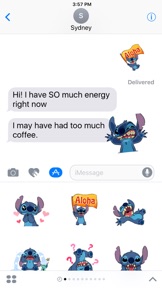
Disney Stickers: Stitch
Add some extraterrestrial flair to your iMessages with this sticker pack featuring the fun-loving, mischievous Stitch!
Express yourself in new ways with dynamic and animated Disney Stickers you can put anywhere in your chat. Scale, rotate, and layer stickers—even place them on photos you send and receive! Discover all our sticker packs in the iMessage App Store including Disney's Beauty and the Beast, Pixar's Finding Dory, and more. Use Disney Stickers to add magic to your iMessages!
• SEND dynamic and animated stickers in chat
• PLACE stickers anywhere on your iMessages
• CUSTOMIZE your photos with stickers in chat
• LAYER stickers over each other, in chat, and on photos
• SCALE & ROTATE stickers
Stickers include:
• Stitch - Love
• Stitch - Aloha
• Stitch - Laugh
• Stitch - Sad
• Stitch - Confused
• Stitch - Play
• Stitch - Dance
• Stitch - Hungry
• Stitch - Cry
• Stitch - Surprised
• Stitch - Shock
• Stitch - Frustrated
• Stitch - Embarrassed
• Stitch - Thank you
• Stitch - Fail
• Stitch - Head Scratch
• Stitch - Pom Pom Celebrate
• Stitch - Tired
• Stitch - Lonely
• Stitch - Bummer
• Stitch - OK
Privacy - http://disneyprivacycenter.com/
Terms of Use - http://disneytermsofuse.com/
Quick tips on installing and using Sticker apps:
• To access iMessage apps, tap the App Store icon alongside the compose field to see your most recently used iMessage app.
• To continue browsing, tap the icon on the lower left corner which brings up the app drawer. From there, tap the plus icon to access the App Store for iMessage, where you can browse and download more apps. Here, you can also go to Manage where you can add your apps to your app drawer.
• To use a sticker within a conversation, you simply tap to send or you can touch and hold to place them on top of bubbles, other Stickers, or even photos. It feels just like peeling and pasting a traditional sticker.
• iPhone and iPad users (running iOS 10) and Apple Watch owners (running watchOS 3) can receive stickers. On Apple Watch, you can send any of the stickers you recently sent from iPhone or iPad. While technically accurate, you may have noticed that you can also receive stickers on earlier versions of iOS and other platforms but they’re received inline as images and don’t support being pasted on top of text, photos etc.
Nouveautés de la version 1.1.3
Accessibility updates
Vendeur
Nom
Disney Electronic Content, Inc.
Informations
Éditeur
Catégories
Version
1.1.3
Taille
9,3 MB
Game Center
Non
VPP Device Licensing
Oui
Classement
Classification : 4+
Compatibilité
iOS 10.0 ou plus récent
Appareils
iPhone 5, iPhone 5c, iPhone 5s, iPhone 6, iPhone 6 Plus, iPhone 6s, iPhone 6s Plus, iPhone SE, iPhone 7, iPhone 7 Plus, iPhone 8, iPhone 8 Plus, iPhone X, iPhone XR, iPhone XS, iPhone XS Max, iPhone 11, iPhone 11 Pro, iPhone 11 Pro Max, iPhone SE (2e génération), iPhone 12, iPhone 12 Pro, iPhone 12 Pro Max, iPhone 12 mini, iPhone 13, iPhone 13 Pro, iPhone 13 Pro Max, iPhone 13 mini, iPhone SE (3e génération), iPhone 14, iPhone 14 Plus, iPhone 14 Pro, iPhone 14 Pro Max, iPhone 15, iPhone 15 Plus, iPhone 15 Pro, iPhone 15 Pro Max, iPhone 16, iPhone 16 Plus, iPhone 16 Pro, iPhone 16 Pro Max, iPhone 16e, iPad (4e génération) (Wi-Fi), iPad (4e génération) (4G), iPad (5e génération) Wi-Fi, iPad (5e génération) Wi-Fi + Cellular, iPad (6e génération) Wi-Fi, iPad (6e génération) Wi-Fi + Cellular, iPad Pro, iPad mini 4 (Cellular), iPad Pro (9,7 pouces), iPad Pro (9,7 pouces) (Cellular), iPad Pro 12,9 pouces (2e génération), iPad Pro 12,9 pouces (2e génération) Wi-Fi + Cellular, iPad Pro (10,5 pouces), iPad Pro (10,5 pouces) Wi-Fi + Cellular, iPad Pro (11 pouces), iPad Pro (11 pouces) Wi-Fi + Cellular, iPad Pro 12,9 pouces (3e génération), iPad Pro 12,9 pouces (3e génération) Wi-Fi + Cellular, iPad Air, iPad Air (Cellular), iPad Air 2, iPad Air 2 (Cellular), iPad Air (3e génération), iPad Air (3e génération) Wi-Fi + Cellular, iPad mini Retina, iPad mini Retina (Cellular), iPad mini 3, iPad mini 3 (Cellular), iPad mini 4, iPad mini 4 (Cellular), iPad mini (5e génération), iPad mini (5e génération) Wi-Fi + Cellular, iPad (7e génération) Wi-Fi + Cellular, iPad Pro 11 pouces (2e génération), iPad Pro 11 pouces (2e génération) Wi-Fi + Cellular, iPad Pro 12,9 pouces (4e génération), iPad Pro 12,9 pouces (4e génération) Wi-Fi + Cellular, iPad Air (4e génération) (Wi-Fi), iPad Air (4e génération) (Wi-Fi + Cellular), iPad (8e génération) Wi-Fi, iPad (8e génération) Wi-Fi + Cellular, iPad Pro 11 pouces (3e génération), iPad Pro 11 pouces (3e génération) Wi-Fi + Cellular, iPad Pro 12,9 pouces (5e génération), iPad Pro 12,9 pouces (5e génération) Wi-Fi + Cellular, iPad (9e génération), iPad (9e génération) Wi-Fi + Cellular, iPad mini (6e génération), iPad mini (6e génération) Wi-Fi + Cellular, iPad Air (5e génération), iPad Air (5e génération) Wi-Fi + Cellular, iPad Pro 11 pouces (4e génération), iPad Pro 11 pouces (4e génération) Wi-Fi + Cellular, iPad Pro 12,9 pouces (6e génération), iPad Pro 12,9 pouces (6e génération) Wi-Fi + Cellular, iPad (10e génération), iPad (10e génération) Wi-Fi + Cellular, iPad Air 11 pouces (M2) Wi-Fi, iPad Air 13 pouces (M2) Wi-Fi, iPad Air 13 pouces (M2) Wi-Fi + Cellular, iPad Pro 11 pouces (M4) Wi-Fi, iPad Pro 11 pouces (M4) Wi-Fi + Cellular, iPad Pro 13 pouces (M4) Wi-Fi, iPad Pro 13 pouces (M4) Wi-Fi + Cellular, iPad mini (A17 Pro) Wi-Fi, iPad mini (A17 Pro) Wi-Fi + Cellular, iPad (A16) Wi-Fi, iPad (A16) Wi-Fi + Cellular, iPad Air 11 pouces (M3) Wi-Fi, iPad Air 11 pouces (M3) Wi-Fi + Cellular, iPad Air 13 pouces (M3) Wi-Fi, iPad Air 13 pouces (M3) Wi-Fi + Cellular, iPod touch (6e génération), iPod touch (7e génération)
Langues
anglais
App Store : Notes
Notes et avis
5,0 sur 5 (6 notes)
App Store : Avis des utilisateurs
Pas d'entrée