Actualisation
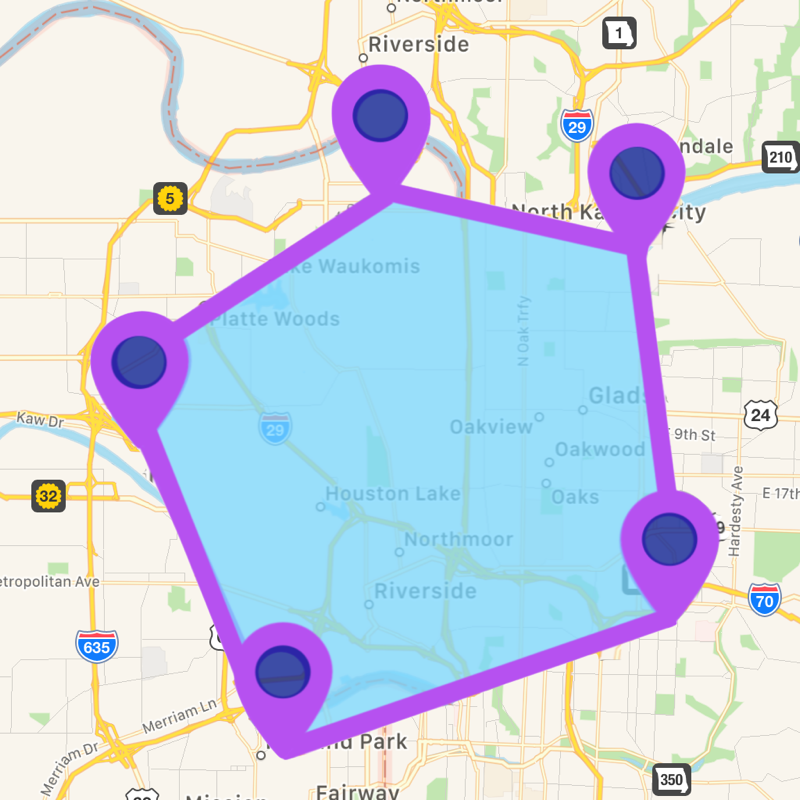


Captures d’écran iPhone


Captures d’écran iPad


Description
Distance,Area draw and Measure On gps Map is an app can easily draw paths, routes, areas, directions, lines, curves, and measures those on Gps map.
Create,load KML and KMZ files easily.
This app works for offline and online.
Features:
• Measure using Pin, Circle or Drawing options.
• 100% accurate measurements.
• Select different metric units.
• Live Drawing : Calculate as you draw.
• Multiple Map Types.
• Undo functionality.
• Calculate the area of a land, Fields, Agricultures, Point to point, lakes, Gardens, Streets, islands,Reservior,stadium,golf clubs,harbor area, parks, farming area, construction area,airports,favourite places, city, etc.
• Calculate the distance of aerial routes.
• High performance and accurate measurements.
• Very intuitive user interface.
App Usage:
Distance Measure:
• In menu click Distance Measure and then long press on gps map to add pointers on map, when two pointers are formed the distance between two pointers will be calculated automatically.
• you can see the count of pointers below the bar and it will be in your control.
• you can change the metric units for measurements like meters,kilometers,feet,yard,mile,Nautical miles etc.
• After completion of measurement you can save it for future reference or you can send it to near or dear through mail.
• you can save the file in two formats kml or kmz and send those to others.
• The saved files will be available in Saved Distance in menu.
• The Saved Distance will be shown in list format and can reload again on gps map.
• Share kml and kmz file to other apps like Email,WhatsApp,Add to Notes,Add to iCloud Drive,Save to files and other apps.
• Easily Export kml or kmz files to Another application
Area Measure:
• In menu click Area Measure and freely draw on map, when the starting point and end point touches then measurement will be calculated automatically.
• you can change the metric units for measurements like hectar,acre,square inch, square meters, square kilometer, square yard, square feet, square mile etc.
• After completion of measurement you can save it for future reference or you can send it to near or dear through mail.
• you can save the file in two formats kml or kmz and send those to others.
• The saved files will be available in Saved Area in menu.
• The Saved Area will be shown in list format and can reload again on gps map.
Available Settings
• User can change Multiple Map types.
• change line color
• change polygon color
Note:
1)This app contains Rich UserInterface.
2)This app contains less labels on map, and more on Menu bar.This helps user easy interaction on Map.
"Continued use of GPS running in the background can dramatically decrease battery life."
--------------------------------------------------------------------------------------------------------------------------------------------------------------------------------------------------------------------------------------------------------
Nouveautés de la version 1.3.4
Upgradations as per latest OS version 15
Bug fixed and Performance Improvements
Vendeur
Nom
p swagath
Informations
Éditeur
Catégories
Version
1.3.4
Taille
4,1 MB
Game Center
Non
VPP Device Licensing
Oui
Classement
Classification : 4+
Compatibilité
iOS 8.0 ou plus récent
Appareils
iPhone 4S, iPhone 5, iPhone 5c, iPhone 5s, iPhone 6, iPhone 6 Plus, iPhone 6s, iPhone 6s Plus, iPhone SE, iPhone 7, iPhone 7 Plus, iPhone 8, iPhone 8 Plus, iPhone X, iPhone XR, iPhone XS, iPhone XS Max, iPhone 11, iPhone 11 Pro, iPhone 11 Pro Max, iPhone SE (2e génération), iPhone 12, iPhone 12 Pro, iPhone 12 Pro Max, iPhone 12 mini, iPhone 13, iPhone 13 Pro, iPhone 13 Pro Max, iPhone 13 mini, iPhone SEThirdGen, iPad 2 (Wi-Fi), iPad 2 (3G), iPad (3e génération) (Wi-Fi), iPad (3e génération) (4G), iPad (4e génération) (Wi-Fi), iPad (4e génération) (4G), iPad (5e génération) Wi-Fi, iPad (5e génération) Wi-Fi + Cellular, iPad (6e génération) Wi-Fi, iPad (6e génération) Wi-Fi + Cellular, iPad Pro, iPad mini 4 (Cellular), iPad Pro (9,7 pouces), iPad Pro (9,7 pouces) (Cellular), iPad Pro 12,9 pouces (2e génération), iPad Pro 12,9 pouces (2e génération) Wi-Fi + Cellular, iPad Pro (10,5 pouces), iPad Pro (10,5 pouces) Wi-Fi + Cellular, iPad Pro (11 pouces), iPad Pro (11 pouces) Wi-Fi + Cellular, iPad Pro 12,9 pouces (3e génération), iPad Pro 12,9 pouces (3e génération) Wi-Fi + Cellular, iPad Air, iPad Air (Cellular), iPad Air 2, iPad Air 2 (Cellular), iPad Air (3e génération), iPad Air (3e génération) Wi-Fi + Cellular, iPad mini (Wi-Fi), iPad mini (4G), iPad mini Retina, iPad mini Retina (Cellular), iPad mini 3, iPad mini 3 (Cellular), iPad mini 4, iPad mini 4 (Cellular), iPad mini (5e génération), iPad mini (5e génération) Wi-Fi + Cellular, iPad (7e génération) Wi-Fi + Cellular, iPad Pro 11 pouces (2e génération), iPad Pro 11 pouces (2e génération) Wi-Fi + Cellular, iPad Pro 12,9 pouces (4e génération), iPad Pro 12,9 pouces (4e génération) Wi-Fi + Cellular, iPad Air (4e génération) (Wi-Fi), iPad Air (4e génération) (Wi-Fi + Cellular), iPad (8e génération) Wi-Fi, iPad (8e génération) Wi-Fi + Cellular, iPad Pro 11 pouces (3e génération), iPad Pro 11 pouces (3e génération) Wi-Fi + Cellular, iPad Pro 12,9 pouces (5e génération), iPad Pro 12,9 pouces (5e génération) Wi-Fi + Cellular, iPad (9e génération), iPad (9e génération) Wi-Fi + Cellular, iPad mini (6e génération), iPad mini (6e génération) Wi-Fi + Cellular, iPad AirFifthGen, iPad AirFifthGenCellular, iPod touch (5e génération), iPod touch (6e génération), iPod touch (7e génération)
Langues
anglais
App Store : Notes
Notes et avis
0,0 sur 5 (Pas de note)
App Store : Avis des utilisateurs
Pas d'entrée