Actualisation


Captures d’écran iPhone



Description
Upload your data from Apple Health to Strava in seconds. After syncing, you can view your fitness data on the Strava app or in your Strava.com account.
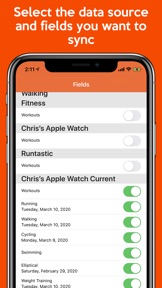
Apple Health to Strava Sync can sync up to 6 fields. You can customize the app to only sync the fields you want. If there are other fields you'd like us to support, please contact us at support@bickster.com - we'd love to hear your feedback!
- Running
- Cycling
- Walking
- Swimming
- Elliptical
- Weight Training
* Apple Health to Strava Sync will not overwrite any data you currently have in Strava
* Before using the app, please read the instructions to make sure everything is set up correctly for a seamless transfer of data
* After reading the instructions, please contact support if you have any issues. We would love to help you. Reach us at support@bickster.com or http://www.myfitnesssync.com/support
Syncing your Apple Health app everyday with Health App to Strava Sync allows you to use the Strava app and your account at strava.com to view your fitness data. Select from multiple sources like your iPhone, Apple Watch, Garmin watches and other fitness devices, or other walking, running, and workout apps that sync with your iPhone and Apple Health.
The app will try to sync your Apple Health data to Strava in the background multiple times per day.
- Auto-sync may take a few days to work, as iOS controls this process based on user behavior. For privacy reasons, iOS will not run an auto-sync if your phone is locked - this can cause auto-sync delays.
- Your Apple Watch does not stay up-to-the-minute in sync with Apple Health on your phone. This can cause the data on your Strava dashboard to be slightly out of sync with your Apple Watch. If you need your Strava dashboard to be exactly in sync with your Apple Watch please launch the Apple Activity app on your phone before syncing with our app. Launching the Activity app forces your Apple Watch to sync with your phone. Launching the Activity app before syncing with our app is not required because by the end of the day your Apple Watch will be in sync with Apple Health and all of your data will be synced to your Strava account.
We want hear from you!! If encounter any issues or would like to request a new feature please email support@bickster.com or click the "App Support" button in the App Store.
HOW DOES IT WORK
Data is synced using 3 easy steps.
1. In the Health App to Strava Sync app, sign into Strava.com using your account credentials.
2. Pick the fitness fields you want to sync with your Strava account.
3. Click the "Sync Now" button to start syncing your Apple Health data with your Strava account
DISCLAIMER: We are not affiliated with the mentioned companies in any way. We only developed and tested our App with their platforms.
Strava is a trademark of Strava Inc., registered in the U.S. and other countries.
Please Note: Continued use of GPS running in the background can decrease battery life. Our tests have shown that our app only uses 1% or less of your battery while running in the background.
Nouveautés de la version 1.1.0
- Faster syncing
Vendeur
Nom
Bickster LLC
Informations
Éditeur
Catégories
Version
1.1.0
Taille
23,8 MB
Game Center
Non
VPP Device Licensing
Oui
Classement
Classification : 4+
Compatibilité
iOS 12.0 ou plus récent
Appareils
iPhone 5s, iPhone 6, iPhone 6 Plus, iPhone 6s, iPhone 6s Plus, iPhone SE, iPhone 7, iPhone 7 Plus, iPhone 8, iPhone 8 Plus, iPhone X, iPhone XR, iPhone XS, iPhone XS Max, iPhone 11, iPhone 11 Pro, iPhone 11 Pro Max, iPhone SE (2e génération), iPhone 12, iPhone 12 Pro, iPhone 12 Pro Max, iPhone 12 mini, iPhone 13, iPhone 13 Pro, iPhone 13 Pro Max, iPhone 13 mini, iPhone SE (3e génération), iPhone 14, iPhone 14 Plus, iPhone 14 Pro, iPhone 14 Pro Max, iPhone 15, iPhone 15 Plus, iPhone 15 Pro, iPhone 15 Pro Max, iPhone 16, iPhone 16 Plus, iPhone 16 Pro, iPhone 16 Pro Max, iPhone 16e, iPhone 17, iPhone 17Pro, iPhone 17ProMax, iPhone Air, iPod touch (6e génération), iPod touch (7e génération)
Langues
anglais
App Store : Notes
Notes et avis
4,0 sur 5 (1 note)
App Store : Avis des utilisateurs
Pas d'entrée