Actualisation


Captures d’écran iPhone


Captures d’écran iPad


Description
Hayden Duet System Concertina is an easy-to-play concertina for both iPhone and iPad.
The Hayden system duet concertina layout is very easy to learn to play, with the notes in scale order.
The iPad version is based on the full 53-button R. Morse Beaumont with the addition of an extra D# on the LHS. This makes it possible to play all of the commonly available Hayden concertina variations on the app.
IMPORTANT: On the iPad version, since you may want to play chords with four or more fingers on the screen at the same time, before playing, disable "Multitasking Gestures" on your iPad (in the Settings app, under the General section, turn the Multitasking Gestures switch to the off position).
How to Play the iPhone Version:
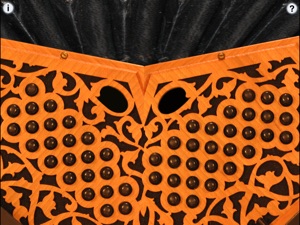
On the iPhone version, the left side is one octave below the right side. Scales walk from the left and right edges towards the center.
On the iPhone version, two of the most common layout options are provided: mirror image and inverted.
To play, simply press the buttons. You may also slide your fingers between the buttons.
Multiple buttons may be pressed at the same time to play chords.
Touch the '?' button to cycle through the following layouts:
Mirror image with labels
Mirror image no labels
Inverted with labels
Inverted no labels
Touch the "i" to bring up the settings page where you may transpose the pitch up or down up to one octave in semitone increments.
Touch the number to the right of the transpose slider to reset the transpose to zero.
When transposed, the note labels do not change, just the pitch produced.
How to Play the iPad Version:
To play, simply press the buttons. You may also slide your fingers between the buttons.
Multiple buttons may be pressed at the same time to play chords.
Touch the '?' button to show/hide the button note labels
Touch the "i" to bring up the settings page where you may transpose the pitch up or down up to one octave in semitone increments.
Touch the number to the right of the transpose slider to reset the transpose to zero.
When transposed, the note labels do not change, just the pitch produced.
Uses high-quality per-note audio samples recorded from a premium concertina.
Thank you to Don Taylor for the gorgeous new iPad version graphics!
Icon image based on a beautiful R. Morse Beaumont Hayden Concertina
Nouveautés de la version 2.8
Bug fixes
Vendeur
Nom
Michael Eskin
Informations
Éditeur
Catégories
Version
2.8
Taille
76,5 MB
Game Center
Non
VPP Device Licensing
Oui
Classement
Classification : 4+
Compatibilité
iOS 16 ou plus récent
Appareils
iPhone 5s, iPhone 6, iPhone 6 Plus, iPhone 6s, iPhone 6s Plus, iPhone SE, iPhone 7, iPhone 7 Plus, iPhone 8, iPhone 8 Plus, iPhone X, iPhone XR, iPhone XS, iPhone XS Max, iPhone 11, iPhone 11 Pro, iPhone 11 Pro Max, iPhone SE (2e génération), iPhone 12, iPhone 12 Pro, iPhone 12 Pro Max, iPhone 12 mini, iPhone 13, iPhone 13 Pro, iPhone 13 Pro Max, iPhone 13 mini, iPhone SE (3e génération), iPhone 14, iPhone 14 Plus, iPhone 14 Pro, iPhone 14 Pro Max, iPhone 15, iPhone 15 Plus, iPhone 15 Pro, iPhone 15 Pro Max, iPhone 16, iPhone 16 Plus, iPhone 16 Pro, iPhone 16 Pro Max, iPhone 16e, iPhone 17, iPhone 17Pro, iPhone 17ProMax, iPhone Air, iPad (5e génération) Wi-Fi, iPad (5e génération) Wi-Fi + Cellular, iPad (6e génération) Wi-Fi, iPad (6e génération) Wi-Fi + Cellular, iPad Pro, iPad mini 4 (Cellular), iPad Pro (9,7 pouces), iPad Pro (9,7 pouces) (Cellular), iPad Pro 12,9 pouces (2e génération), iPad Pro 12,9 pouces (2e génération) Wi-Fi + Cellular, iPad Pro (10,5 pouces), iPad Pro (10,5 pouces) Wi-Fi + Cellular, iPad Pro (11 pouces), iPad Pro (11 pouces) Wi-Fi + Cellular, iPad Pro 12,9 pouces (3e génération), iPad Pro 12,9 pouces (3e génération) Wi-Fi + Cellular, iPad Air, iPad Air (Cellular), iPad Air 2, iPad Air 2 (Cellular), iPad Air (3e génération), iPad Air (3e génération) Wi-Fi + Cellular, iPad mini Retina, iPad mini Retina (Cellular), iPad mini 3, iPad mini 3 (Cellular), iPad mini 4, iPad mini 4 (Cellular), iPad mini (5e génération), iPad mini (5e génération) Wi-Fi + Cellular, iPad (7e génération) Wi-Fi + Cellular, iPad Pro 11 pouces (2e génération), iPad Pro 11 pouces (2e génération) Wi-Fi + Cellular, iPad Pro 12,9 pouces (4e génération), iPad Pro 12,9 pouces (4e génération) Wi-Fi + Cellular, iPad Air (4e génération) (Wi-Fi), iPad Air (4e génération) (Wi-Fi + Cellular), iPad (8e génération) Wi-Fi, iPad (8e génération) Wi-Fi + Cellular, iPad Pro 11 pouces (3e génération), iPad Pro 11 pouces (3e génération) Wi-Fi + Cellular, iPad Pro 12,9 pouces (5e génération), iPad Pro 12,9 pouces (5e génération) Wi-Fi + Cellular, iPad (9e génération), iPad (9e génération) Wi-Fi + Cellular, iPad mini (6e génération), iPad mini (6e génération) Wi-Fi + Cellular, iPad Air (5e génération), iPad Air (5e génération) Wi-Fi + Cellular, iPad Pro 11 pouces (4e génération), iPad Pro 11 pouces (4e génération) Wi-Fi + Cellular, iPad Pro 12,9 pouces (6e génération), iPad Pro 12,9 pouces (6e génération) Wi-Fi + Cellular, iPad (10e génération), iPad (10e génération) Wi-Fi + Cellular, iPad Air 11 pouces (M2) Wi-Fi, iPad Air 13 pouces (M2) Wi-Fi, iPad Air 13 pouces (M2) Wi-Fi + Cellular, iPad Pro 11 pouces (M4) Wi-Fi, iPad Pro 11 pouces (M4) Wi-Fi + Cellular, iPad Pro 13 pouces (M4) Wi-Fi, iPad Pro 13 pouces (M4) Wi-Fi + Cellular, iPad mini (A17 Pro) Wi-Fi, iPad mini (A17 Pro) Wi-Fi + Cellular, iPad (A16) Wi-Fi, iPad (A16) Wi-Fi + Cellular, iPad Air 11 pouces (M3) Wi-Fi, iPad Air 11 pouces (M3) Wi-Fi + Cellular, iPad Air 13 pouces (M3) Wi-Fi, iPad Air 13 pouces (M3) Wi-Fi + Cellular, iPod touch (6e génération), iPod touch (7e génération)
Langues
anglais
App Store : Notes
Notes et avis
0,0 sur 5 (Pas de note)
App Store : Avis des utilisateurs
Pas d'entrée