Description
Take note of life with Chronicle, a simple journaling app that offers more than bound sheets without overcomplicating the writing experience.
Focused writing. Multiple photos per entry that you can move, resize, rotate - your words flow around them. A recent New York Magazine article cites research showing people experienced improvement in "physical and mental well-being. They were happier, less depressed and less anxious" after writing about emotional or stressful events for a few days.
Start writing more, today. Reliable storage, autosave, and passcode lock protect your words; share or read them on your computer with PDF, text, and email export. You can also create backups and save them to other apps such as Dropbox, Drive, and Evernote.
Your journal will never run out of pages, but you can manage different topics or years in separate journals with the notebooks add-on.
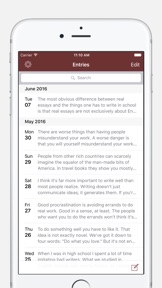
Take a break from social networks. Write comfortably knowing you can find anything you wrote with built-in search. Search results include relevant snippets of text so you can easily find the exact entry you’re looking for.
According to a Harvard Business School paper, taking 15 minutes to reflect on your work at end of the workday can boost job performance (the study's journaling group performed 22.8% better on a test than the control group that simply continued working).
Start keeping a journal or diary. Organize chapters for a novel. Jot down notes and ideas. You can always export what you’ve written for safekeeping.
WHAT OTHERS SAY
* "A great app - probably my favourite app on my new iPad actually. Thanks!" - Jennifer N. v1.1.3
* "This is a developer who cares about quality product and is willing to consider any feature and solve any problem." - rbart09 on v1.0.6
* "Be assured that even with zero changes, this app is a real winner and a bargain at that!" - DeborahJay on v1.0
* "This is an elegant app that makes journaling with the iPad a snap, pretty much any time anywhere." - chaletchic on v1.0.3
* "I love the ease of use and simplicity, it really promotes getting your ideas down quickly and efficiently." - Tim Thomas on v1.0.2
THINGS YOU CAN DO
* Distraction free writing in portrait or landscape mode
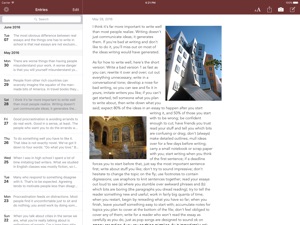
* Put photos where you want. The text wraps around them.
* No limit to the number of photos you can put on the page
* Pick a font and font size just like you do in iBooks
* Customize the text color of your journal
* Easy back-dating; tap to adjust the entry date as needed
* Resize and rotate photos. Tap for a fullscreen, zoomable version.
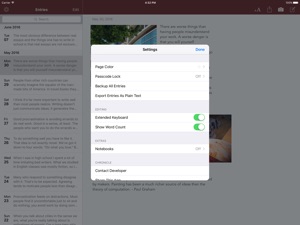
* Customize your journal's page color
* Crisp PDF export preserves layout and photo placement
* Export your entire journal as a plain text file
* Fast search that provides context around keywords
* Support for Dynamic Type means text is never too small to read
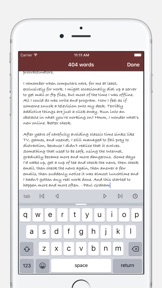
* Extended keyboard makes it easy to insert timestamps into your writing
* Turn word count on to see a total as you type
* Optimized scrolling; scroll back a whole year in a few seconds
* Set a password to protect your journal entries
* Export single entries via email, with photos embedded
* Quick launch. Chronicle remembers the last entry you were on.
* Arrange your photos by dragging them; rotate with two fingers
* Autosave and undo while you're writing
EXTRA JOURNALS
If you need a way to organize your writing, get the Notebooks add-on with in-app purchase. The cover is styled based on your text settings within the notebook. Unlimited notebooks you can drag and reorder.
ACCESSIBLE
No need to squint. In addition to being able to adjust the journal's font size, you can change the system's Text Size from the Settings app to make the UI text in Chronicle easy to read. I've also added accessibility and VoiceOver improvements.
Thank you for all of the emails with compliments and suggestions! Please consider rating the app or leaving a review.
SUPPORT
Contact me at slidetorock.com with questions / suggestions.
Nouveautés de la version 2.0.4
Celebrating more than SIX YEARS on the App Store! This update focused on fixing bugs and updating the app so that it works better on all iOS devices. Extensive under-the-hood changes, with a few you'll notice (a little anticlimactic for me after all this work!).
Each update clears the previous reviews. Thanks for taking the time to update your review/rating for new releases - it means a lot to me.
- New setting to show entry and photo storage; you can force deletion of temporary files to save space
- Support for Slide Over and Split View multitasking on iPad
- Improved handling of iOS Text Size settings adjustments
- Improved PDF rendering / printing
- Better, sharper photo thumbnails
- Extended keyboard layout adjustments
- Notebook covers are more adaptive and look better on all devices
- Improved code to handle deleting temporary exported/shared files to cut down on storage
- Updated search library to improve journal indexing
- Fix for jumpy behavior when rotating device while viewing a journal entry
- Added 3 new fonts to the text styles
- Fixed bug that caused words to underlap keyboard while typing
- Better support for input assistant buttons on iPad keyboard (undo, copy, paste)
- Fixed bug in app's settings that occurred when scrolling up and down rapidly
- Updated share/export dialogs (removed previous workaround for iOS 8 issue)
- Search results reload to reflect any changes in system text size
- Fixed transition animations (opening notebooks and viewing photos under iOS 9)
- Updated layout to work better no matter what screen size you have
- Faster launch and improved launch screen for all devices
- Fixed a silent crash that could occur when exiting the app
- Fixed a crash that could occur when editing date of old entry
- Improved support for iOS 9 and 10 (maintains iOS 8 compatibility)
- Removed some workarounds that were necessary under iOS 7
- Updated alert views, action sheets, and popovers
Previous changes:
- Privacy lock enhancements, especially for older devices
- Ability to export all entries as a text file
- Faster backup and export creation
- Ability to Mail your backups or you can 'Open In...' to save them elsewhere
- App keeps recent backups, cleans up older ones to save storage
- Fix for database concurrency issues that could lead to rare crash
- Minor performance update related to displaying entry date