Description
• Version Anglaise - ne contient PAS de voix française !
• Version Française disponible sous le nom "Les Nombres Montessori"
Ce jeu peut être utiliser pour se familiariser avec les chiffres anglais. En particulier, il existe une activité qui prononce un chiffre entre 0 et 1000 et qui vous demande de l'écrire avec des chiffres.
Ce jeu est destiné aux enfants anglophones afin de les aider à acquérir la notion de nombre et quantité. Il permet d'associer une quantité avec le nom d'un nombre ou les symboles utilisés pour écrire ce nombre, et d'apprendre à utiliser les symboles pour écrire un nombre.
--> English Description
From the creator of the award-winning Montessori Crosswords and Word Wizard apps, Montessori Numbers is designed to help build sound mathematical foundations in children aged 3-7 by using a concrete, visually significant material inspired from the Montessori methodology.
Learn to understand quantities and numbers, learn the numerals and build numbers from 0 to 1000.
Montessori Numbers offers a sequence of guided activities that gradually help children reinforce their skills. The app can be used with children aged 3-7. Each activity offers several levels of increasing complexity.
1 - Experiment with quantities and learn their names
2 - Learn the numerals and their names
3 - Associate quantities with numerals
4 - Understand the decimal system
5 - Introduce addition and subtraction
Montessori Numbers builds on the iPad’s touch feature, and uses verbal feedback for more efficient learning. The app can pronounce any number between 0 and 1009, and American, British and Australian voices are available.
___________
Activities
___________
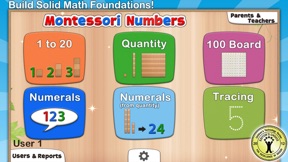
• 1 to 20
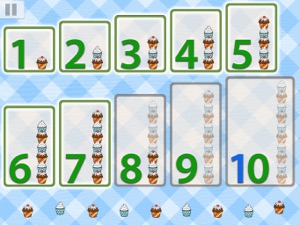
This activity is designed to introduce numbers up to 10 - but since number names up to 20 are also difficult to memorize, we have added a special level for numbers from 11 to 20.
There are 3 levels of difficulty: 0 to 5, 0 to 10 and 11 to 20.
• Quantity
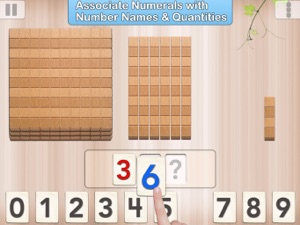
In this activity, kids associate quantities to numbers by manipulating units, bars of 10, and squares of 100 to match a given number. As the game is started, an option allows you to hide the numerals to work specifically on the association of number names with quantities.
The child can also touch placed beads to make the app count them, and touch numbers to hear their names.
There are 3 levels of difficulty: 0 to 9, 10 to 99 and 100 to 999.
• Numerals
In this activity, number names are to be associated with numerals. As a number name is pronounced, kids are invited to build the corresponding numeral. Kids can freely experiment with numerals and hear the names associated with each numeral they build. The quantity representing the numbers built is also displayed to reinforce the association between quantity and numerals.
There are 3 levels of difficulty: 0 to 9, 10 to 99 and 100 to 999.
• Numerals (from Quantity)
In this activity, a quantity is to be associated with a given numeral. The child must build the number that matches the quantity displayed. This is the most complex activity because the child must count the quantity displayed, and then build the number using the numerals.
There are 3 levels of difficulty: 0 to 9, 10 to 99 and 100 to 999.
• Building Game:
A game can be started at the end of each activity (availability can be modified in the settings panel). There is no “real” goal to this game - kids can play freely with the materials, thus becoming more familiar with them. Kids can add any material and numeral they want, and build whatever they want.