Actualisation


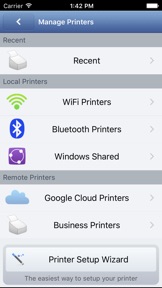
Captures d’écran iPhone


Captures d’écran iPad


Description
With PrintHand Mobile Print Premium you can print photos, web pages, emails, attachments, contacts and files saved to various cloud services.
Many other apps, including Mail, Safari and Notes, allow you to copy something and paste it to PrintHand for printing or even share content to the printing app using the Action button.
One can print on Wi-Fi, Bluetooth, AirPrint, Windows Shared and Google Cloud Print printers.
IMPORTANT
Prior to purchasing the app we do recommend referring to the list of supported printers and printing a test page from the free PrintHand Mobile Print app.
Here is the list of printers supported by PrintHand app:
http://printhand.com/list_of_supported_printers.php
Please make sure that your printer is supported.
In case your printer is not supported, direct printing from your mobile device might be impossible. However, printing from PrintHand Mobile Print Premium using PrintHand Remote desktop software installed on your computer is an option if you can print from your computer on the same printer.
Please visit http://www.printhand.com/shared_printers.php to download the PrintHand Remote desktop software.
FEATURES
Using PrintHand you can print the following content:
- Office documents, including MS Word, Excel, PowerPoint, PDF shared from web browser or stored in Cloud services;
- Text files shared from web browser or stored in Cloud services;
- Photos and images;
- Web pages;
- Emails and attachments;
- Google Drive content;
- Contacts;
- Facebook albums;
- Files from Dropbox;
- Files from Box;
- Files from OneDrive;
- Content copied to clipboard (using Paste to Print);
- Content shared from other apps using the Action button.
You can print via:
- Wi-Fi (using a Wi-Fi Direct printer or using a Wi-Fi router as a middleman);
- Bluetooth (only on supported Apple MFi certified printers);
- PC or Mac (if your printer is shared using PrintHand Remote desktop client or standard tools of your computer's OS);
- Google Cloud Print;
- AirPrint.
USING PRINTERS
Printing on Nearby wireless printers
Most of the Wi-Fi printers are detected automatically. PrintHand can print on such printers directly in case they are supported by the app.
As long as your printer is available from a Windows or Mac computer, you can print via the PrintHand Remote. To use it, please visit http://www.printhand.com/shared_printers.php to download the PrintHand Remote desktop software.
Print Hammermill app installed on your mobile device will find printers shared via the PrintHand Remote desktop app automatically. However, please note that your printer should be connected to the same Wi-Fi network to which your mobile device is connected.
Remote printing via the Internet
Also, you can print on printers located anywhere in the world via the Internet. This will require the same PrintHand Remote software installed on the computer at the receiving end, and a PrintHand Remote account registered. Printing from the PrintHand Mobile Print Premium remotely using the PrintHand Remote does not require any additional payments.
Nouveautés de la version 1.8.7
Stability improvements on older devices
Informations
Éditeur
Catégories
Version
1.8.7
Taille
44,3 MB
Game Center
Non
VPP Device Licensing
Oui
Classement
Classification : 4+
Compatibilité
iOS 8.0 ou plus récent
Appareils
iPhone 4S, iPhone 5, iPhone 5c, iPhone 5s, iPhone 6, iPhone 6 Plus, iPhone 6s, iPhone 6s Plus, iPhone SE, iPhone 7, iPhone 7 Plus, iPhone 8, iPhone 8 Plus, iPhone X, iPhone XR, iPhone XS, iPhone XS Max, iPhone 11, iPhone 11 Pro, iPhone 11 Pro Max, iPhone SE (2e génération), iPhone 12, iPhone 12 Pro, iPhone 12 Pro Max, iPhone 12 mini, iPad 2 (Wi-Fi), iPad 2 (3G), iPad (3e génération) (Wi-Fi), iPad (3e génération) (4G), iPad (4e génération) (Wi-Fi), iPad (4e génération) (4G), iPad (5e génération) Wi-Fi, iPad (5e génération) Wi-Fi + Cellular, iPad (6e génération) Wi-Fi, iPad (6e génération) Wi-Fi + Cellular, iPad Pro, iPad mini 4 (Cellular), iPad Pro (9,7 pouces), iPad Pro (9,7 pouces) (Cellular), iPad Pro 12,9 pouces (2e génération), iPad Pro 12,9 pouces (2e génération) Wi-Fi + Cellular, iPad Pro (10,5 pouces), iPad Pro (10,5 pouces) Wi-Fi + Cellular, iPad Pro (11 pouces), iPad Pro (11 pouces) Wi-Fi + Cellular, iPad Pro 12,9 pouces (3e génération), iPad Pro 12,9 pouces (3e génération) Wi-Fi + Cellular, iPad Air, iPad Air (Cellular), iPad Air 2, iPad Air 2 (Cellular), iPad Air (3e génération), iPad Air (3e génération) Wi-Fi + Cellular, iPad mini (Wi-Fi), iPad mini (4G), iPad mini Retina, iPad mini Retina (Cellular), iPad mini 3, iPad mini 3 (Cellular), iPad mini 4, iPad mini 4 (Cellular), iPad mini (5e génération), iPad mini (5e génération) Wi-Fi + Cellular, iPad (7e génération) Wi-Fi + Cellular, iPad Pro 11 pouces (2e génération), iPad Pro 11 pouces (2e génération) Wi-Fi + Cellular, iPad Pro 12,9 pouces (4e génération), iPad Pro 12,9 pouces (4e génération) Wi-Fi + Cellular, iPad Air (4e génération) (Wi-Fi), iPad Air (4e génération) (Wi-Fi + Cellular), iPad (8e génération) Wi-Fi, iPad (8e génération) Wi-Fi + Cellular, iPad Pro 11 pouces (3e génération), iPad Pro 11 pouces (3e génération) Wi-Fi + Cellular, iPad Pro 12,9 pouces (5e génération), iPad Pro 12,9 pouces (5e génération) Wi-Fi + Cellular, iPod touch (5e génération), iPod touch (6e génération), iPod touch (7e génération)
Langues
français, allemand, anglais, chinois, coréen, espagnol, japonais, portugais, russe
App Store : Notes
Notes et avis
0,0 sur 5 (Pas de note)
App Store : Avis des utilisateurs
Pas d'entrée