À proposConditionsConfidentialitéContact
 
Actualisation
Video & TV Cast + Samsung TV

Video & TV Cast + Samsung TV

Date de sortie : 2016-06-05
© 2kit consulting
Video & TV Cast + Samsung TV - QR Code
Version 1.19
17+
Télécharger dans l'App Store
Version 1.19
17+
Télécharger dans l'App Store
Date de sortie : 2016-06-05
© 2kit consulting

Captures d’écran iPhone

Capture d'écran
Capture d'écran
Capture d'écran
Capture d'écran
Capture d'écran

Captures d’écran iPad

Capture d'écran
Capture d'écran
Capture d'écran
Capture d'écran
Capture d'écran

Description

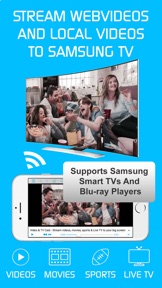
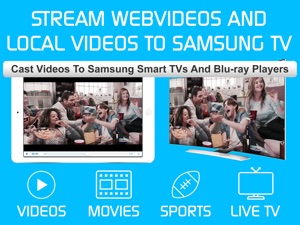
Watch any web-video, online movie, livestream or live tv show on your Samsung Smart TV or Blu-ray Player. Enjoy the show on your big screen with the no#1 web video streamer.
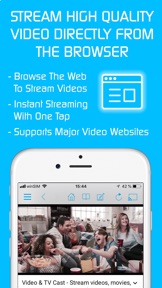
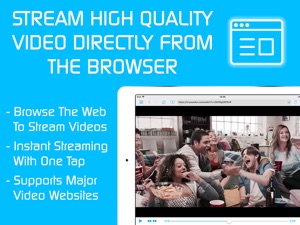
With Video & TV Cast for Samsung Smart TV you can browse the web and stream any web video, online movie, livestream or live tv show you want on your Samsung Smart TV. Mp4, m3u8, hls livestreams and also video-over-https are supported.
There is no time limit at all! You can watch videos of 2 minutes or 2 hours or even more. Just open Video & TV Cast, navigate to a website, wait for link detection and send the video with a single tap to your Samsung Smart TV. The discovered link will be shown below the browser. A tap on the link will start the show. You don't need to install a big media server like Plex or any other third party software.
>>> Important Notes
* To enable video casting please open the Samsung App Store (Smart Hub) on your TV or Blu-ray Player, search for 'TV Cast' and install the receiver app.
* Please enter the ip-adress of your iPhone/iPad by using the number pad and up/down/left/right keys on your Samsung TV Remote. Just enter the numbers, no need to press the enter key.
* iTunes movies, Flash video and other DRM protected videos like HBO now are not supported!
* Please use the Remote Playbar for video control while browsing (see more info below)
* The app streams only the video part of a website and not the whole website content (No screen or tab mirroring!).
* Sometimes it is necessary to play the video on your iPad or iPhone first before it gets discovered by the app for streaming. It may also be neccessary to start casting multiple times until it works with specific videos.
* If a specific video is not working, please check the FAQ on the app startpage. If that does not help you, please drop us an email before leaving a negative comment on the App Store. We will try to add support for that website as soon as possible.
>>> PRO FEATURES
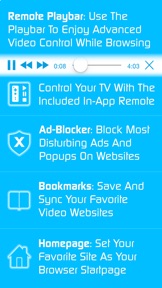
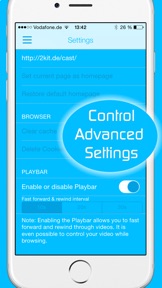
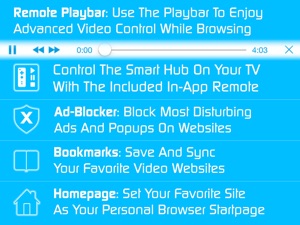
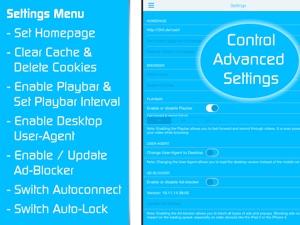
* Remote Playbar: Use the Playbar for advanced video control while browsing, including video scrubbing, forward, rewind, play, pause, stop. The playbar works on all Samsung Smart TVs and Blu-ray Players. You can also use the included TV Remote for basic video control (play, pause, stop, forward and rewind videos) and navigating in Samsung Smart Hub. The TV Remote currently works on 2010 - 2013 TVs.
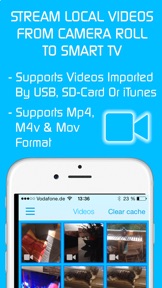
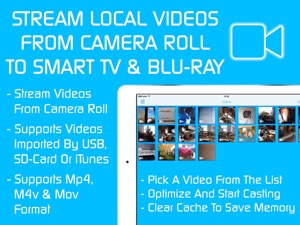
* Local Videos: Cast your camera roll videos from an iPhone or iPad. Supports mp4, m4v and mov videos that were saved to the camera roll via Apples SD-Card/USB Adapter, iTunes Desktop Software or third party apps.
* Ad-Blocker + No Sponsoring Ads: The Pro app version has no ads and the Ad-Blocker blocks ads & popups on most websites that you visit. You can update, enable/disable ad-blocking at any time in the settings.
* Bookmarks: Save unlimited website bookmarks. Synchronize and transfer them between different TV Cast apps and iOS devices by using backup and restore via iCloud.
* Desktop Mode: Change the browser user-agent and cloak your iPhone/iPad as a desktop PC to load the desktop website instead of a mobile website. Please note that this will NOT enable video casting on websites that serve Flash videos in desktop mode.
* Change Homepage: Set your personal homepage in the settings.
Disclaimer: This app is not affiliated with Samsung or any other trademark mentioned here.

Nouveautés de la version 1.19

- Bug fixes
Please rate us on the App Store == It‘s very quick and will help us improve this app to provide you with better features and services.

Vendeur

Nom

Kraus und Karnath GbR 2Kit Consulting

Informations

Catégories

Version

1.19

Taille

37,7 MB

Game Center

Non

VPP Device Licensing

Oui

Classement

Classé 17+ :
Accès au Web non contrôlé.

Compatibilité

iOS 9.0 ou plus récent

Appareils

iPhone 11 Pro Max, iPad Air 2 (Cellular), iPad mini Retina (Cellular), iPad Pro (11 pouces), iPad (5e génération) Wi-Fi, iPad (6e génération) Wi-Fi, iPod touch (6e génération), iPad Pro (11 pouces) Wi-Fi + Cellular, iPad (6e génération) Wi-Fi + Cellular, iPad Pro 12,9 pouces (3e génération), iPad (5e génération) Wi-Fi + Cellular, iPad mini (5e génération) Wi-Fi + Cellular, iPad mini (5e génération), iPad Pro, iPad mini 3, iPad mini 4 (Cellular), iPad mini 4, iPhone 11, iPod touch (7e génération), iPad mini 3 (Cellular), iPad Air, iPad Air 2, iPad Pro 12,9 pouces (2e génération), iPad mini 4 (Cellular), iPad Pro (9,7 pouces) (Cellular), iPad Pro (10,5 pouces) Wi-Fi + Cellular, iPad Pro (9,7 pouces), iPad mini Retina, iPad Air (Cellular), iPad Air (3e génération) Wi-Fi + Cellular, iPhone 6 Plus, iPad Air (3e génération), iPad Pro (10,5 pouces), iPad Pro 12,9 pouces (2e génération) Wi-Fi + Cellular, iPhone 6, iPhone XR, iPhone XS, iPhone 6s, iPhone SE, iPhone 7 Plus, iPhone 6s Plus, iPhone 5s, iPhone X, iPhone 8, iPhone XS Max, iPhone 8 Plus, iPhone 7, iPhone 5, iPad (7e génération) Wi-Fi, iPhone 5c, iPad (7e génération) Wi-Fi + Cellular, iPad Air3, iPad Air3Cellular, iPad Mini5, iPad Mini5Cellular, iPhone 11 Pro, iPad Pro 12,9 pouces (3e génération) Wi-Fi + Cellular

Langues

anglais

App Store : Notes

Notes et avis

4,5 sur 5 (6 notes)

App Store : Avis des utilisateurs

2019-01-30

Nickel

Rien à redire.
Legarshonnête
Version 1.18
2018-10-28

Nul !!!

Nul !!!!! Aucune image n’est retransmise sur ma tv , je mets un match sur canalplay et ça me sort une émission en saccadé sur une autre chaine !
khaled95400
Version 1.18
2018-10-07

Trop bien

Cooooool👍😁
cb67000
Version 1.18
2018-05-29

Worst app ever!

Purchased it for 7,99€ worked for only 2 minuets like literally 2 minuets disconnected the tv on its own and when i tried to reconnect it, it stopped working.
Tania.B
Version 1.16
2017-11-01

Picture deformed / image déformée

The image is deformed in full screen on TV SAMSUNG!
L’image est déformée en plein écran sur les TV Samsung !
J’espère que cela va être rapidement corriger par les prochain Fix. Sinon bonne application
Ced20100718
Version 1.14
2017-08-20

Very disappointed

This app doesn't work properly, how can I get my money back?
E.n-joy
Version 1.12
2017-05-20

Super appli

Géniale ! Je n'utilise qu'elle pour visualiser mes vidéos de mon iPhone ou mon iPad sur grand écran. À utiliser sans recommandation…
Essayez vous serez conquis !
Lutzylutz
Version 1.11