Actualisation


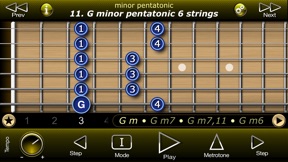
Captures d’écran iPhone



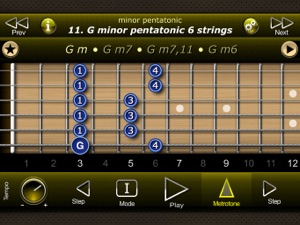
Captures d’écran iPad



Description
All musicians of different styles are familiar to blues scale. However, it is difficult to imagine a musician who would not use the pentatonic scale in his repertoire.
This app contains a unique set of modal pentatonic scales, which you can play over certain chords. There are many different pentatonic scales (Indian, Chinese, Japanese, Korean). Some of them have several names. Therefore, in this app we use more academic scale names. Pentatonic scales played on the 6 and 5 strings, with 2 notes on the string (2-2 concept), which contributes to easy learning and memorization. Some pentatonic scales contain extended fingering. The earlier musician starts using extended fingering, the better.
Modal Pentatonic Scales app is a unique material for your improvisations!
App Features:
------------------------
● 480 pentatonic scales, which can be easily transposed, resulting in more than 5,700 of total scales (incl. transposition)!
● Harmony feature: you can see and listen to the chords, over which given scales can be played. More information about these chords you can find in our "International Guitar Chords 1 & 2" apps
● Every scale is provided with corresponding optimal fingerings for your comfort
● Transpose scales into any desired key by dragging notes on the screen with your finger
● Metrotone with precount and adjustable tempo + time signature for training
● Cursor can display note names or fingering (selectable)
● Notes can display note names or fingering (selectable)
● Degree indicator. It allows you to examine scale steps in detail
● Sharp and flat signatures correspond to the current scale's key
● Fast cycled playback with adjustable tempo (30 - 360 BPM)
● Step by step note playback in both directions for detailed learning of scales
● Manual note selection by tapping notes on the screen
● Two guitar sound banks (Acoustic and Distortion) to select
● Six selectable harmony timbres to choose from
● Stereo Chorus FX for harmony chords at your choice
● guitar Reverb effect
● Designed for both iPhone and iPad
● iPhone X support
● Guitar Driller integration support
Note: please don't forget to launch this app at least one time to make it available in Guitar Driller's "My Content" list.
For support and documentation please visit
http://www.fonexsis.com
Nouveautés de la version 2.0
This app has been updated by Apple to display the Apple Watch app icon.
- the whole graphics engine updated, introducing support for high resolution displays of the newest iOS devices;
- iPhone X support added;
- Guitar Driller integration added. Guitar Driller is our brand new app, which allows you to collect exercises from various Fonexsis guitar apps into one Guitar Driller app, create and edit your own playlists for training, plus many other cool features! You can download Guitar Driller for FREE in the App Store;
- new redesigned Scale Selector;
- guitar Reverb effect added (adjust from the Settings page)
- cursor and strings animation effects added;
- new Favorites system;
- "Show root notes" feature added;
- improved graphics design;
- playback tempo is now controlled with the "Tempo" knob, located in the bottom panel. Harmony balance slider has been moved to Settings page
- Lefty view mode added to display fretboard for Lefties (turn it on from Settings page -> Lefty view mode)
- you can now select Metrotone's sound from 6 available types!
- Tips of the Day feature added, where you can find useful tips about how to use the app.
Vendeur
Informations
Éditeur
Catégories
Version
2.0
Taille
19,1 MB
Game Center
Non
VPP Device Licensing
Oui
Classement
Classification : 4+
Compatibilité
iOS 9.0 ou plus récent
Appareils
iPhone 4S, iPhone 5, iPhone 5c, iPhone 5s, iPhone 6, iPhone 6 Plus, iPhone 6s, iPhone 6s Plus, iPhone SE, iPhone 7, iPhone 7 Plus, iPhone 8, iPhone 8 Plus, iPhone X, iPhone XR, iPhone XS, iPhone XS Max, iPhone 11, iPhone 11 Pro, iPhone 11 Pro Max, iPhone SE (2e génération), iPhone 12, iPhone 12 Pro, iPhone 12 Pro Max, iPhone 12 mini, iPhone 13, iPhone 13 Pro, iPhone 13 Pro Max, iPhone 13 mini, iPad 2 (Wi-Fi), iPad 2 (3G), iPad (3e génération) (Wi-Fi), iPad (3e génération) (4G), iPad (4e génération) (Wi-Fi), iPad (4e génération) (4G), iPad (5e génération) Wi-Fi, iPad (5e génération) Wi-Fi + Cellular, iPad (6e génération) Wi-Fi, iPad (6e génération) Wi-Fi + Cellular, iPad Pro, iPad mini 4 (Cellular), iPad Pro (9,7 pouces), iPad Pro (9,7 pouces) (Cellular), iPad Pro 12,9 pouces (2e génération), iPad Pro 12,9 pouces (2e génération) Wi-Fi + Cellular, iPad Pro (10,5 pouces), iPad Pro (10,5 pouces) Wi-Fi + Cellular, iPad Pro (11 pouces), iPad Pro (11 pouces) Wi-Fi + Cellular, iPad Pro 12,9 pouces (3e génération), iPad Pro 12,9 pouces (3e génération) Wi-Fi + Cellular, iPad Air, iPad Air (Cellular), iPad Air 2, iPad Air 2 (Cellular), iPad Air (3e génération), iPad Air (3e génération) Wi-Fi + Cellular, iPad mini (Wi-Fi), iPad mini (4G), iPad mini Retina, iPad mini Retina (Cellular), iPad mini 3, iPad mini 3 (Cellular), iPad mini 4, iPad mini 4 (Cellular), iPad mini (5e génération), iPad mini (5e génération) Wi-Fi + Cellular, iPad (7e génération) Wi-Fi + Cellular, iPad Pro 11 pouces (2e génération), iPad Pro 11 pouces (2e génération) Wi-Fi + Cellular, iPad Pro 12,9 pouces (4e génération), iPad Pro 12,9 pouces (4e génération) Wi-Fi + Cellular, iPad Air (4e génération) (Wi-Fi), iPad Air (4e génération) (Wi-Fi + Cellular), iPad (8e génération) Wi-Fi, iPad (8e génération) Wi-Fi + Cellular, iPad Pro 11 pouces (3e génération), iPad Pro 11 pouces (3e génération) Wi-Fi + Cellular, iPad Pro 12,9 pouces (5e génération), iPad Pro 12,9 pouces (5e génération) Wi-Fi + Cellular, iPad (9e génération), iPad (9e génération) Wi-Fi + Cellular, iPad mini (6e génération), iPad mini (6e génération) Wi-Fi + Cellular, iPod touch (5e génération), iPod touch (6e génération), iPod touch (7e génération)
Langues
anglais
App Store : Notes
Notes et avis
0,0 sur 5 (Pas de note)
App Store : Avis des utilisateurs
Pas d'entrée